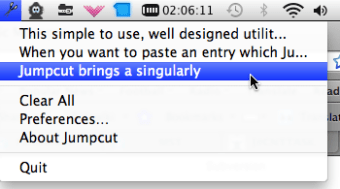
You should be able to go back through your history of pasted text so that if you accidentally overwrite some copied text you can still access it. That's exactly what Jumpcut does in the easiest and most accessible way possible. Jumpcut remembers every little bit of text you copy or cut during a day giving you easy access to your clipboard's history via your Menu bar. Whatever you copy, Jumpcut compiles line by line all of the text you've cut or copies during the day. If you need to paste the text, just select it and it pastes instantly.
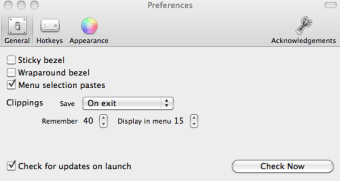
The app is represented by an easy-to-spot scissors icon in your Menu bar or you can configure a hotkey instead which is supposed to bring-up a bezel displaying a list of the most recent items you worked with. However, I couldn't work out how to record a hotkey. You're supposed to just click the hotkey symbol and record but recording wouldn't work for me.
However, this takes little away from what is a simple and well designed utility that could prove essential for those who do a lot of cutting, copying and pasting all day.
Changes
* Bezel window now interacts well with Spaces, and will appear wherever your document is rather than reverting to the first Space it was used in
* Tool tip for wraparound bezel
* Rewording of existing tool tips
Jumpcut is an application that provides "clipboard buffering" — that is, access to text that you've cut or copied, even if you've subsequently cut or copied something else. The goal of Jumpcut's interface is to provide quick, natural, intuitive access to your clipboard's history.
Jumpcut is designed to be simple. Download the application, double-click the .tgz file to open it, and drag the application (the one with the pretty scissors icon) to your Applications directory. Launch Jumpcut. A scissors icon will appear in your menu bar. Now whenever you cut or copy a text item, it'll be added to the "stack" of clippings that Jumpcut has recorded. Clippings can be accessed in one of two ways:
Under the menu bar
Choose a clipping from the Jumpcut menu.
Through a pop-up bezel
In any application into which you want to paste an item from Jumpcut's stack, press the hotkey to activate Jumpcut's bezel. (The default value for this hotkey is Control-Option-V.) A little window like the one you see when using the application switcher or the brightness controls will appear. While holding the modifier keys (for the default hotkey, this is the Control-Option combo), use the arrow keys to scroll through the stack.
When you've selected a clipping, Jumpcut will put it on the pasteboard and attempt to paste it into your application. It does this by mimicking a user typing Command-V, so unusual applications which don't use this to indicate "Paste" will be confused. The clip will still be on the pasteboard, though, so you can paste it normally. If Command-V is used in a non-standard way in applications you are trying to paste to, a preference is available to disable the "paste" action for clippings selected from the menu bar. In this case, choose the clipping and paste however your application asks you to do it.
Used it for years, it stopped working and I panicked! Then I found another similar app recommending updating Privacy Accessibility preferences for their similar app. If you're having issues with Jumpcut in Mojave try adding these permissions:System Preferences> Security + Privacy> Privacy Tab> Accessibility Option> Add Jumpcut to the ListSystem Preferences> Security + Privacy> Privacy Tab> Full Disk Access Option> Add Jumpcut to the ListSystem Preferences> Security + Privacy> Privacy Tab> Automation Option> Add Jumpcut to the ListRestart Jumpcut and hopefully it works for you like it did for me. for another few years of usage!
Anonymous user
One of those basic apps that effortlessly and flawlessly provides functionality omitted from the MacOSX.
Anonymous user
Worked for years, now it does not. . It worked fine for years. Now that I'm using Vivaldi for a browser, nothing will paste into the browser. I'm afraid it's time to move on if I can't find tech support or some other answer. Cons: It copies but does not past in certain browsers.
Anonymous user
Have loved it for years and want it for my iPhone, can't find alternative.. Have loved it for years and want it for my iPhone. Can't find an alternative however for the iPhone. Pros: Love it totally. Cons: same app for iPhone
Anonymous user
A life and time saver. This is a great app. I use it a lot for posting to Excel….also for posting news excerpts plus the link to FB. I wouldn't be without it. Been looking for an app like this for a long long time.
Anonymous user
It does work, I figured it out.. Hotkey: I used command J, but lots of combinations don't work though.Bezel: use the arrow keys to navigate between the copies!Pros: easy to install; easy to use (once you have figured it out); very useful.Cons: lacks manual
Laws concerning the use of this software vary from country to country. We do not encourage or condone the use of this program if it is in violation of these laws. Softonic may receive a referral fee if you click or buy any of the products featured here.